How to add music to an Instagram story on PC
To add music to an Instagram story on a PC, use a Chrome extension that offers Instagram's songs, such as InstaDesk or INSSIST, or mix your own audio into a video first and upload that. Instagram's music sticker itself is a phone app feature, and we found no reliable source saying Meta Business Suite offers it for stories. If you only need one song once, the phone does it in a minute.
What are the ways to add music to a story from a computer?
| Method | Who it suits | Watch out for |
|---|---|---|
| Instagram's phone app | Anyone with their phone to hand | It isn't from your PC |
| InstaDesk | People who want an Instagram song on a story from Chrome | 3 free songs on new installs, then Pro; check the result on your phone |
| INSSIST | People who already use it as their desktop client | Its guide lists music on stories; check its plans |
| A video editor | Your own voice or audio you have the rights to | Instagram won't know what the song is |
Does Meta Business Suite let you add music to a story?
We couldn't confirm that it does, so don't plan on it. Sked's April 2026 guide describes Meta's Sound Collection for reels in Business Suite, and calls it royalty-free rather than the popular audio you see in the app. Nothing we could check describes the music sticker for stories there.
How do I add a song to a story with InstaDesk?
- Add InstaDesk to Chrome and open instagram.com. Refresh if the tab was already open.
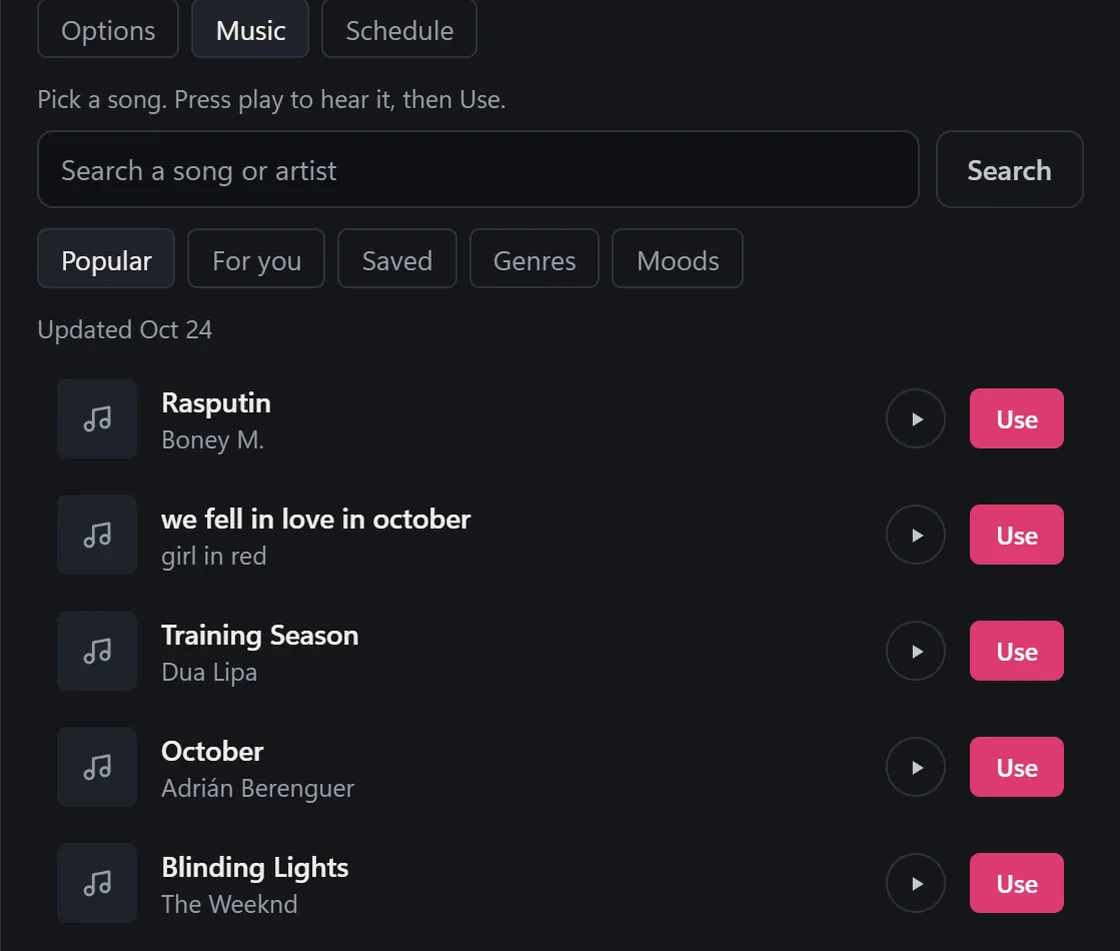
- Click the launcher and choose Add music. It opens the Story tab on the Music pane.
- Drag in your photo or video.
- Look through Popular, For you, Saved, Genres or Moods. Press play to hear a song.
- Press Use.
- For a photo, pick 5s, 10s or 15s. For a video, choose whether you hear the song over the video or use it as the story's only sound.
- Press Share. InstaDesk prepares the story in your browser, then posts it. Check it on your phone.
A photo goes up as a short video story with the song playing, because that's how the song gets on it. That's also why it takes a moment longer than a plain photo. The same pane works on the Reel tab too.
How do I add my own audio to a story from a PC?
If it's your own voiceover or a track you have the rights to, mix it into the video before you upload. Any desktop video editor can do this. InstaDesk also has Music on video under More tools, which does the mix in your browser, so the file stays on your computer until you post it.
- Add your video and audio file to the editor, and set the volume and start point.
- Export it as an MP4, under 60 seconds if it's going up through InstaDesk.
- Upload it as a normal story.
The sound plays, but Instagram doesn't treat it as one of its songs, and commercial music you add this way is your own copyright risk.
What are the limits of adding music from a PC?
- A song goes on a single story only. A story set can't carry one, and neither can a carousel.
- An original-audio sound from someone's reel can't go on a story. InstaDesk tells you to pick a song instead.
- InstaDesk adds the song itself and tries to add its label. It can't always tell whether a label stuck, or whether a song plays silent, so look at the story on your phone.
- If InstaDesk can't mix the song in, it tells you and nothing is posted.
- Instagram's music can be restricted by region and account type, including some business accounts. A tool can't get around that.
- New installs of InstaDesk 4.0.5 and later get 3 free songs, then songs are Pro. A failed mix doesn't use one, and a story with no song doesn't use a try. See the pricing section.
Common questions
Can I add Instagram's own songs to a story without a phone?
Yes, with a Chrome extension such as InstaDesk, which lets you pick from lists of Instagram's songs on your computer.
Why can't I add music to a story on instagram.com?
Instagram's music sticker is a phone app feature. Sked's guide says the browser doesn't offer popular audio for reels either.
Can I add a song to a photo story?
Yes. In InstaDesk a photo goes up as a 5, 10 or 15-second video story with the song playing.
Can I put a song and a link on the same story?
Yes. InstaDesk does both in one pass, on a photo or a video. It uses one link try and one song try on new installs.