How to post an Instagram carousel from your PC
To post a carousel from a PC, go to instagram.com, click Create, select several photos or videos and share them as one post. Meta Business Suite does this for professional accounts and can schedule it, and InstaDesk, a Chrome extension, adds dragging to reorder, first comments and scheduling in your browser. Instagram's app allows up to 20 items, but InstaDesk stops at 10, so that's the number to check.
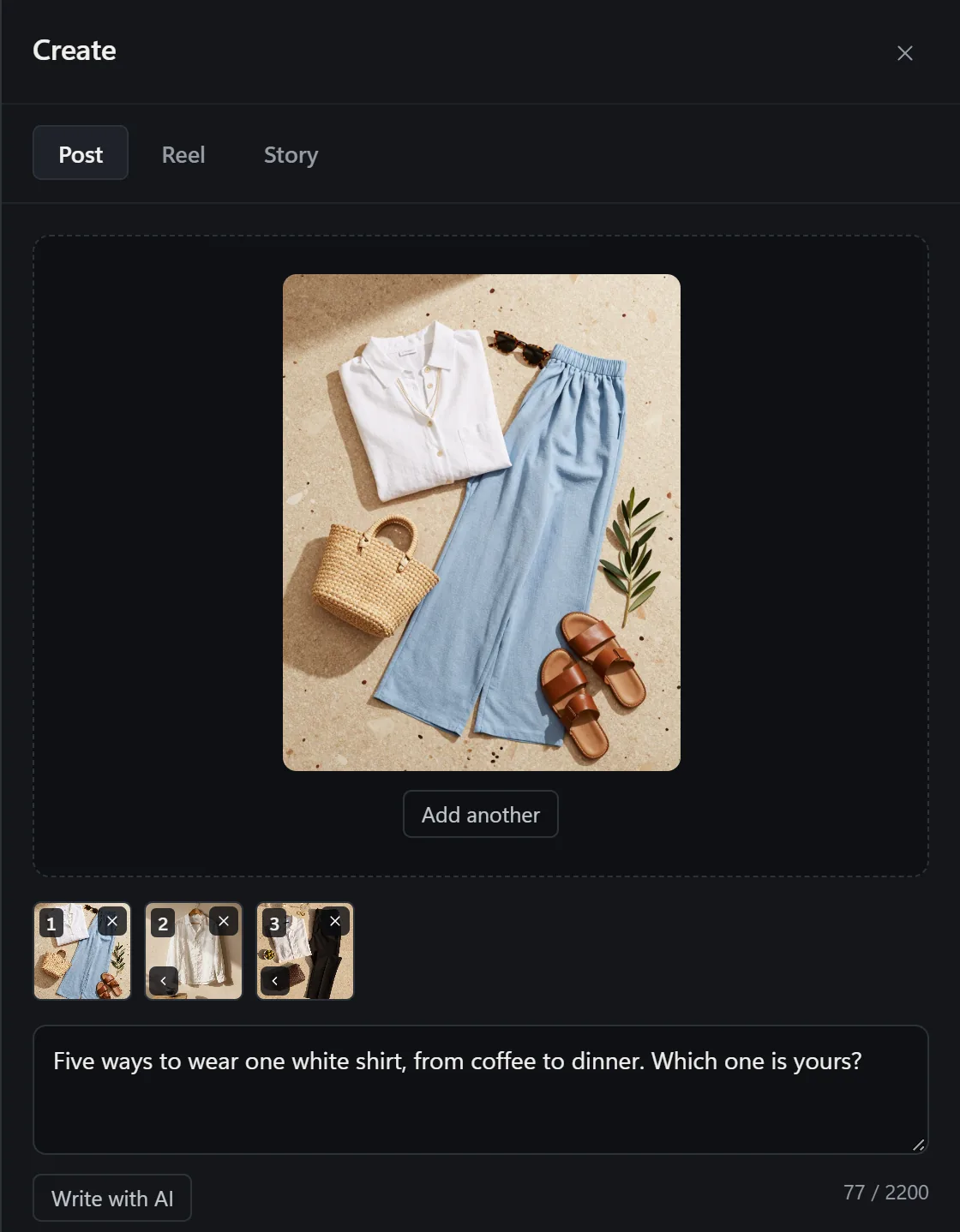
How can you post a carousel from a computer?
| Method | Who it suits | Watch out for |
|---|---|---|
| instagram.com | Posting right now, nothing to install | Sources differ on its item limit |
| Meta Business Suite | Professional accounts connected to a Facebook Page | No personal accounts |
| InstaDesk | Any account in Chrome that wants reordering, first comments or scheduling | 10 items at most, and no song on a carousel |
How do I post multiple photos on instagram.com?
From Hopper's July 2026 guide:
- Log in at instagram.com and click Create.
- Drag your files in, or use the Select multiple icon to pick more than one.
- Put them in order and crop them.
- Add your caption and click Share.
How do I post a carousel with Meta Business Suite?
You need a business or creator account connected to a Facebook Page. From PostNitro's 2026 guide:
- Go to business.facebook.com on your computer and choose Create post.
- Select your Instagram account.
- Upload your photos and videos, then add a caption.
- Publish or schedule it.
How do I post a carousel with InstaDesk?
- Add InstaDesk to Chrome and open instagram.com. Refresh if the tab was already open.
- Click the launcher, choose Post or reel, and stay on the Post tab.
- Drag in up to 10 photos and videos, or press Choose from computer. They can be mixed.
- Drag the thumbnails to change the order, and press × to remove one.
- Write your caption. Under Tag people you can add a collaborator, and Location adds a place.
- Under Options, you can add hashtags as a first comment and alt text, turn off commenting, or hide like and view counts.
- Press Share, or use Schedule to send it later.
If you'd rather post each file on its own, the Schedule tab has Queue each file separately.
How many photos can a carousel have on PC?
Instagram raised its limit to 20 in August 2024. On a computer it depends on the route: Hopper says instagram.com takes 10, and PostNitro says Business Suite takes 20. We couldn't find a page from Meta to settle it, so trust what your upload screen lets you do. InstaDesk's limit is firm: 10.
What are the limits in InstaDesk?
- 10 items. For 11 to 20, use the phone app or try Business Suite.
- Shape: InstaDesk refuses a photo that's too tall or too wide for a feed post as you add it, and names the file, instead of letting Instagram refuse it after the upload. 4:5 is the tallest that always goes up, and 1.91:1 the widest. A phone screenshot usually needs the Story tab instead.
- No song: InstaDesk doesn't put music on a carousel. For a song, post a reel.
- Scheduling: scheduled posts go up while Instagram is open in a tab, and 2 can wait at a time on the free plan.
- Tries: a carousel doesn't use any of the free tries for link stories, songs or downloads. Other limits are in the pricing section.
- Any tool can stop working when Instagram changes, and we can't promise anything about how Instagram treats an account.
Common questions
Can I mix photos and videos in a carousel from my PC?
Yes. InstaDesk's Post tab takes both in one carousel.
Can I reorder carousel photos before posting?
Yes. In InstaDesk, drag the thumbnails. The order you see is the order they post in.
Why was my photo refused?
Instagram only takes certain shapes in a feed post. Crop it nearer to square, with 4:5 as the tallest and 1.91:1 as the widest that reliably go up.