How to view Instagram stories anonymously
Instagram has no built-in way to watch stories anonymously: if you're logged in, your name goes on the viewer list. The workarounds are the airplane-mode trick, a second account, a third-party viewer site for public accounts, or a browser tool such as InstaDesk's Ghost mode, a Pro tool that holds back the signal marking a story as seen on your computer. None of them works perfectly, and none is a way into a private account you can't already see.
Which ways of viewing stories anonymously actually work?
| Method | Who it suits | Watch out for |
|---|---|---|
| Airplane mode | A quick look on your phone, nothing to install | Unreliable; the view can still register |
| A second account | Accounts that don't mind seeing another name | That name still shows on the list |
| Viewer websites | Public accounts only, if you accept the risk | Ads, trackers and fake download buttons |
| InstaDesk's Ghost mode | Watching on your computer in Chrome | Pro only, stories only |
| A VPN | Nobody, for this | It doesn't hide your view if you're logged in |
Does airplane mode hide your Instagram story view?
Sometimes. The idea is to let stories load, go offline, watch, and close the app before reconnecting. Bitdefender's 2026 guide calls it unreliable: a story that hadn't fully loaded can still register, and an Instagram update can break it.
- Open Instagram and wait for the stories row to load.
- Turn on airplane mode.
- Watch the story.
- Close the app fully before you turn airplane mode off.
Are anonymous story viewer sites safe?
Be careful with them. Bitdefender warns that they can carry trackers, malicious ads and misleading download buttons, and that they only work for public accounts. Never give one your Instagram login, and treat any site that claims to show private stories as a red flag.
How does InstaDesk's Ghost mode work?
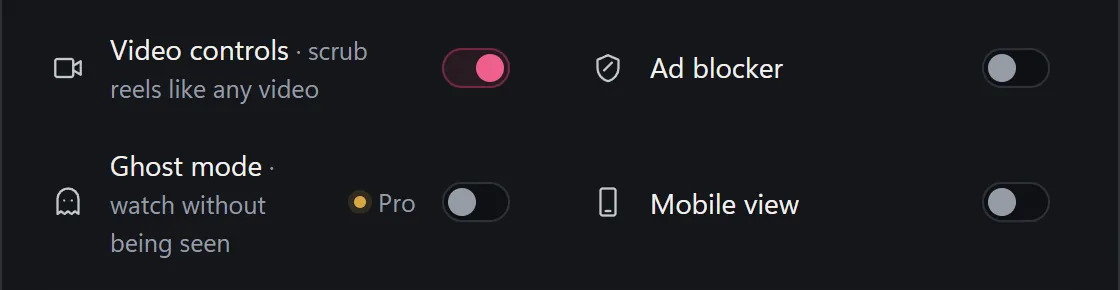
On instagram.com, your browser tells Instagram when you've seen a story. With InstaDesk's Ghost mode on, that message isn't sent from that browser, and the story plays as usual. It's a Pro tool from the start, with no free tries. See the pricing section.

- Add InstaDesk to Chrome and open instagram.com on your computer.
- Click the launcher and choose More tools.
- Turn on the Ghost mode switch. InstaDesk confirms it with a short message.
- Reload the page, then watch stories in that tab.
- To check it, post a story from a second account you own, watch it, and look at its viewer list on your phone.
What doesn't Ghost mode do?
- It doesn't cover messages. InstaDesk's own message says it plainly: messages may still show as read.
- It only works in the browser on your computer where it's switched on. Watching in the phone app counts as normal.
- A reply or reaction is a real message, so the person will see it came from you.
- It doesn't open private accounts. You can only watch what your account can already see.
- Instagram can change how views are recorded at any time. We can't promise it will always work, or say how Instagram treats an account that uses it. Check with a second account if it matters.
Use it with some thought for other people. If someone has blocked or restricted you, that's their answer, and no tool here changes it.
Common questions
Can someone see if I watch their Instagram story?
Yes, normally. Your username shows on their viewer list if you're logged in, and Instagram has no setting to turn that off.
Can I view a private account's story anonymously?
No. Private accounts need you to log in and be an approved follower. Be wary of any tool that says otherwise.
Does Ghost mode hide that I read a DM?
No, don't count on it. It's for stories. InstaDesk's own message says messages may still show as read.
Is Ghost mode free?
No. It's a Pro tool, and it has no free tries.