How to pick a custom Instagram reel cover
To pick a custom reel cover on your phone, tap Cover on the share screen, then choose a frame from the video or add an image from your camera roll. On a computer, Meta Business Suite offers a thumbnail step, and InstaDesk, a Chrome extension, lets you drag a slider to pick any frame of your video. InstaDesk can't take a separate image as the cover, so for a designed one, use the phone or Business Suite.
What are the ways to set a reel cover?
| Method | Cover from a frame | Cover from your own image | After posting |
|---|---|---|---|
| Instagram's phone app | Yes | Yes | Yes |
| Meta Business Suite | Yes | Yes | Not confirmed |
| instagram.com | Sources differ | Sources differ | Not confirmed |
| InstaDesk | Yes | No | No |
How do I change a reel cover on my phone?
From Later's guide, updated August 2025:
- Create your reel and tap Next to reach the share screen.
- Tap Cover on the preview.
- Drag to choose a frame, or add an image from your camera roll.
- Tap Crop profile image to position it for your grid.
To change a reel you've already posted, the same guide says to open it, tap the three dots, choose Edit, then Cover. Later notes that a camera roll image is usually sharper than a frame.
Can you pick a reel cover on instagram.com?
Guides disagree. Sked's April 2026 guide says the browser lets you pick a frame or upload an image after the crop step, while SocialBu says desktop doesn't support custom covers. It may vary by account. Upload your video and see what the screen after cropping offers.
How do I pick a reel cover from my PC with InstaDesk?
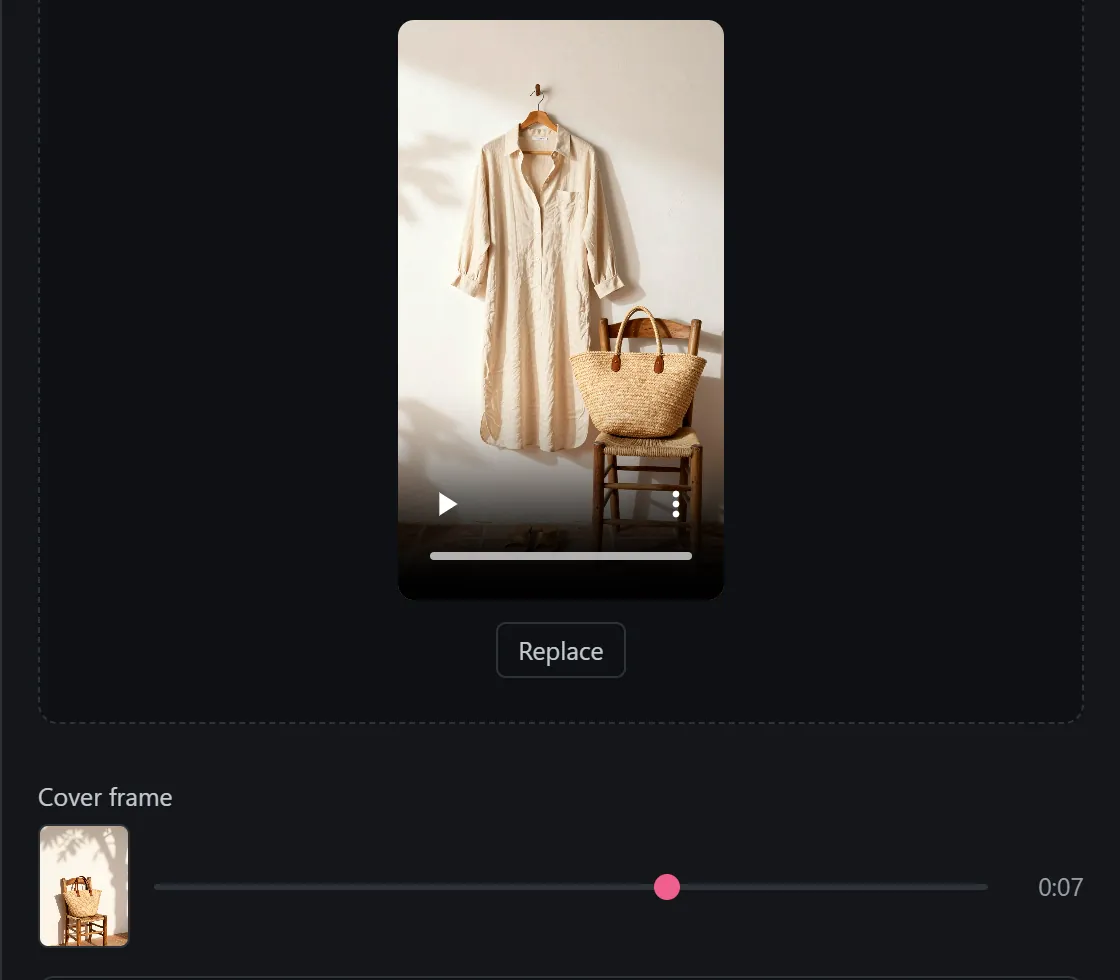
InstaDesk shows the cover slider as soon as you add a video. It's part of posting a reel and doesn't use a free try.
- Add the extension to Chrome and open instagram.com. Refresh if the tab was already open.
- Click the launcher, choose Post or reel, then the Reel tab.
- Drag in your video.
- Under Cover frame, drag the slider. The small picture shows the frame you've chosen, and the time beside it shows where it is.
- Add your caption and press Share, then look at the reel on your profile.
How do I use a designed cover if InstaDesk only picks frames?
You can put your design in the video. It'll show when the reel plays, so keep it short.
- Make your cover at the same size as the video. Later suggests 1080 x 1920 pixels.
- In a video editor, put it at the start of your video as a brief still, and export.
- Upload that video and drag the slider onto the still.
If you don't want it in the video, set the cover in the phone app or in Business Suite instead.
What are the limits?
- InstaDesk's slider only picks frames from your video, and only before posting. To change it later, use the phone app.
- The cover picker is for videos on the Reel tab. A photo post has no cover to choose.
- Instagram crops covers differently in different places, so keep faces and words near the middle. Later has the details, and they may change.
- A good cover can't guarantee views, and any tool can stop working when Instagram changes. Pricing is here if you want the rest of InstaDesk's tools.
Common questions
Can I change a reel cover after posting?
On the phone app, yes: open the reel, tap the three dots, Edit, then Cover. InstaDesk can't change it after posting.
Can I upload my own image as a reel cover from a PC?
Meta Business Suite has that step. InstaDesk doesn't: it picks a frame from your video.
What size should a reel cover be?
Later suggests 1080 x 1920 pixels, the same as a story.